
You can easily change the password if you have access to your WordPress account.
1. Log in to the WordPress dashboard.
2. From the Dashboard menu, go to Users and click on Profile.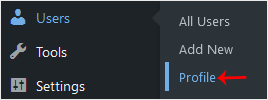
3. Scroll down to Account Management and click on Set New Password.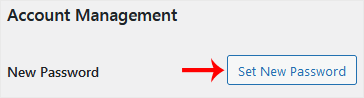
4. Copy the password to a safe place and click on Update Profile to change your password.
- Home
-
Store
- Browse All
- Shared Linux Hosting
- Shared Windows Hosting
- VPS Hosting India
- Microsoft 365 Email Solution
- Google Workspace Email Solution
- Business Email Solution
- Enterprise Email Solution
- Office 365 Enterprise Email
- VPS Hosting USA SSD
- SSL Certificates
- Weebly Website Builder
- CodeGuard
- SiteLock
- Email Spam Filtering
- Software
- ZOHO MAIL
- SSL Certificates
- Website Builder
- Website Backup
- Website Security
- E-mail Services
- Register a New Domain
- Transfer Domains to Us
- Announcements
- Knowledgebase
- Network Status
- Affiliates
- Contact Us
-
More
