
You can find our nameservers in your hosting welcome email. You need to update your domain nameservers to our nameservers.
If your domain is registered on 123-Reg, you should follow this tutorial to update your domain's Nameservers.
1. Open the 123-reg.co.uk website and click on Control Panel. It will show you a login form.
2. Enter the username and password of your 123-reg account and click on Log-in.
3. After a successful login, select the appropriate domain from the drop-down list and then click on Manage.
4. Scroll down to the Advanced domain settings and click on Change Nameservers (DNS).
5. Enter your nameservers in the text fields and click on Update.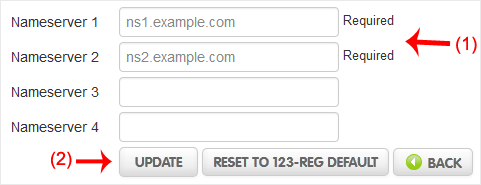
You will see a success message.
Note: It may take anywhere from 12 to 24 hours for the changes to take effect worldwide.
- Home
-
Store
- Browse All
- Shared Linux Hosting
- Shared Windows Hosting
- VPS Hosting India
- Microsoft 365 Email Solution
- Google Workspace Email Solution
- Business Email Solution
- Enterprise Email Solution
- Office 365 Enterprise Email
- VPS Hosting USA SSD
- SSL Certificates
- Weebly Website Builder
- CodeGuard
- SiteLock
- Email Spam Filtering
- Software
- ZOHO MAIL
- SSL Certificates
- Website Builder
- Website Backup
- Website Security
- E-mail Services
- Register a New Domain
- Transfer Domains to Us
- Announcements
- Knowledgebase
- Network Status
- Affiliates
- Contact Us
-
More
